HACKRATE / Pentest visibility
See a pentest
through HackGATE.
HackGATE gives your team visibility into authorized pentester activity routed through its managed gateway. See how a project owner can review authenticated requests, activity over time, and the application areas that received traffic, then use that record in the final review.
What your team can review.
- Authorized participants and approved targets
- Authenticated requests within a selected window
- Activity patterns and route-level request counts
- The activity record alongside validated findings
HACKRATE / PENTEST VISIBILITY
Inside the HackGATE dashboard
See what happened
during the test.
A final report explains what the testers found. HackGATE adds a record of the activity that passed through the gateway, which your team can review during the engagement and bring into the closeout discussion.
Use the numbered markers to read the example dashboard below.
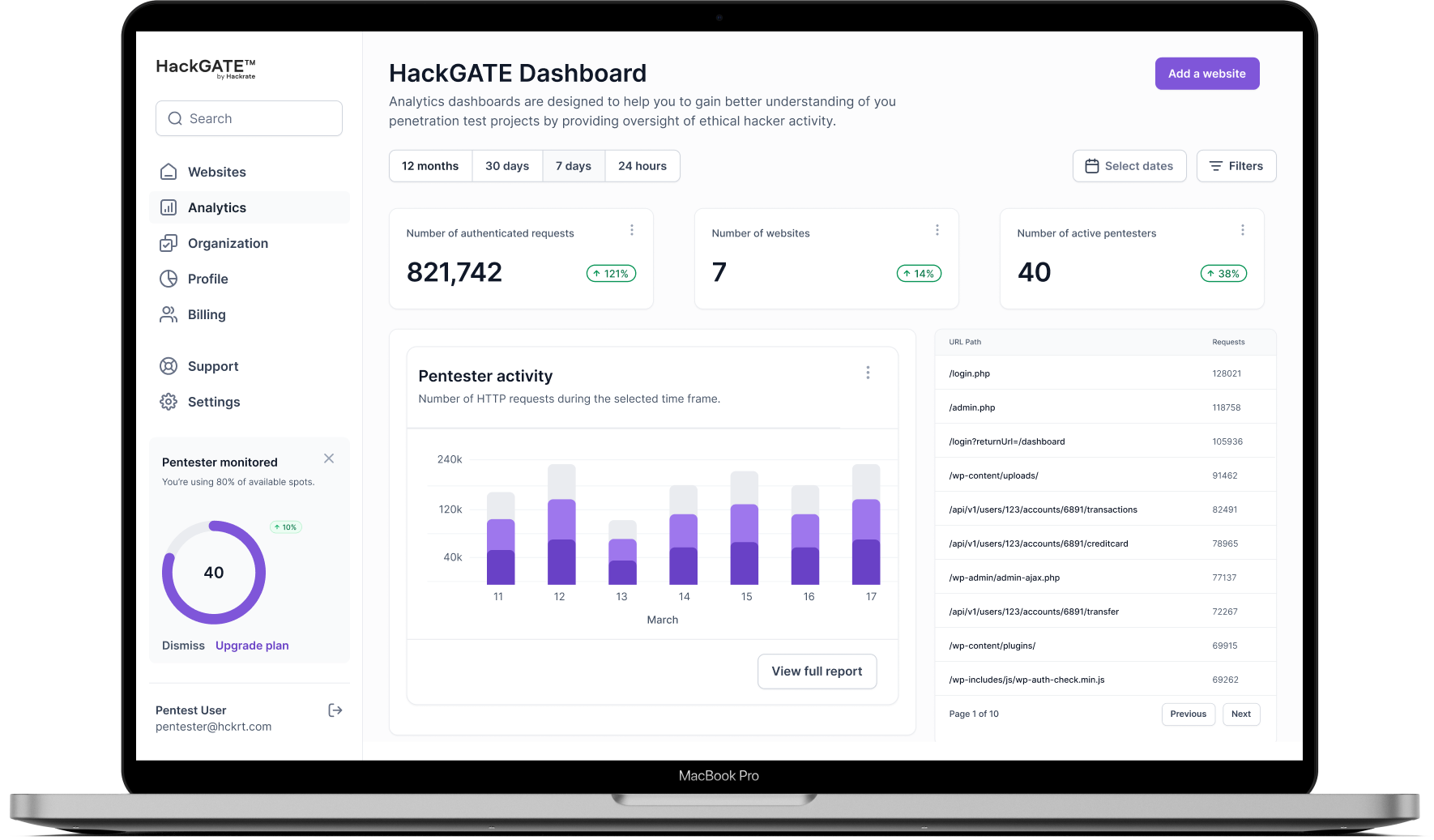
- Choose the time range
Review the activity within the test window you agreed.
- Review participation
See active pentesters and authenticated requests in the selected view.
- Follow activity over time
See when requests reached the gateway and discuss gaps with the testing team.
- See which areas received traffic
Compare request counts by application path with the agreed scope.
Read the dashboard alongside the assessment.
A request count gives you a record of activity. The testers' report explains which workflows and roles they assessed, which findings they validated, and what remained outside scope. Read both to understand what the test covered.
From access to closeout
What your team can review at each stage.
If you choose HackGATE, agree the scope, access, and evidence you want to see before testing begins.
BEFORE TESTING
Agree who can access what.
Confirm the application targets, authorized pentesters, testing window, and where the gateway will be used. Name the people who can review activity and agree how the team will handle sensitive evidence.
DURING TESTING
Review the activity in context.
Use the selected time range and application-path view to ask informed questions. If an area looks quiet, confirm with the tester whether it was assessed, how, and whether any work was outside the gateway.
AT CLOSEOUT
Connect observations to the handoff.
Review the agreed activity evidence with the test scope, limitations, and validated findings. Record follow-up work and which teams own it. Agree in advance whether activity evidence needs to accompany the final deliverables.
HackGATE records configured traffic routed through it. Your assessment may include other in-scope work that the testers describe separately.
HackGATE in practice
How customers used it.
XUND / API ASSESSMENT
Visibility during an initial pentest.
Hackrate used HackGATE to monitor pentester activity during XUND's initial PTaaS engagement. XUND later extended the relationship into a private bug bounty program as part of its development process.
Read the XUND case studyLENSING / CROWDSOURCED PENTEST
Oversight while preparing for an audit.
Lensing worked with Hackrate on crowdsourced testing ahead of its SOC 2 audit. Its Head of Security described HackGATE as giving the team a different perspective on its penetration testing work.
Read the Lensing case studyFrequently asked questions
The details worth agreeing.
Use these answers to prepare the conversation about your own scope and responsibilities.
Can I see what pentesters are doing during a Hackrate engagement?
When HackGATE is included and configured for the engagement, your authorized team can review activity routed through the gateway. The dashboard can show authenticated requests, active pentesters, activity by time window, and request counts by application path. Agree which targets, traffic, and viewers are included before testing.
Does HackGATE capture all pentest activity?
HackGATE provides visibility into traffic routed through its configured gateway. Activity outside that route is outside the gateway's record. Ask your team and provider to document those boundaries and describe how any separately assessed areas will be covered in the assessment report.
Do request counts tell us how thoroughly a feature was tested?
Request counts show observed activity during a selected time range. Judging coverage requires the approved scope and the tester's explanation of what was assessed, including roles, workflows, and limitations. Review the activity record alongside the written assessment and validated findings.
Is HackGATE included in every traditional pentest?
HackGATE is optional for traditional penetration testing and can be discussed when planning an engagement. Confirm the configuration, authorized access, data-handling requirements, and reporting deliverables in the proposal.
What should we ask to see in a HackGATE demo?
Ask to see an illustrative project with a time range, authenticated activity, and a review of the application areas that received traffic. Then discuss how the activity record would be interpreted alongside the test scope, reporting limitations, and findings for your own engagement.
PLAN YOUR NEXT STEP
Practical guides. Clearer decisions.
Compare services, plan your budget and prepare the people behind your security program.
Expert Answers from Levente Molnár
Hackrate CTO Levente Molnár explains bug bounty and managed VDP decisions: team workload, researcher selection, critical reports and getting started.
Read the guideBug Bounty vs. Penetration Testing vs. Managed VDP
Compare bug bounty, penetration testing and managed VDP: objectives, scope, costs, deliverables and customer responsibilities. Choose your next security step.
Read the guideHow to Choose a Bug Bounty Provider
Compare bug bounty providers on researcher expertise, triage, rewards and reporting. See how Hackrate helps you launch and manage a program your team can use.
Read the guideHow to Choose a Managed VDP Provider
Compare managed VDP providers on triage, researcher communication, reporting and service terms. See how Hackrate helps you run a structured disclosure process.
Read the guideHow to Choose a PTaaS Provider
Compare PTaaS providers on testing scope, tester expertise, reporting, integrations and retesting. See how Hackrate connects expert testing to remediation.
Read the guideWhat Human Testers Can Find That Scanners Miss
See where human security testing adds context beyond automated scans, with an example from SEON and three illustrative business scenarios.
Read the guideMoving Your Bug Bounty Program to Hackrate
Plan your move to Hackrate with a bug bounty migration checklist covering scope, open reports, researcher communication, outstanding rewards and launch readiness.
Read the guideMoving Your Self-Hosted Bug Bounty to Hackrate
Move your self-hosted bug bounty to Hackrate's managed service. Plan triage handover, pending rewards, researcher onboarding and engineering responsibilities.
Read the guideMoving Your Self-Hosted VDP to Hackrate
Move your self-hosted VDP to Hackrate's managed service. Plan policy updates, report handover, security inbox routing and researcher communication.
Read the guideHow Much Does a Bug Bounty Program Cost?
Plan a bug bounty budget: platform and management fees, researcher rewards, setup and internal effort. See a worked example and a practical quote checklist.
Read the guideHow Much Time Will Our Team Need?
See the customer tasks behind managed bug bounty and VDP programs: scope, technical access, risk decisions, remediation and urgent escalation.
Read the guideBug Bounty Without an Internal Security Team
Run a managed bug bounty without a dedicated security team. Understand customer ownership, engineering readiness, validation support and VDP alternatives.
Read the guideYour First Month with Hackrate
Explore an illustrative first month of managed bug bounty or VDP: objectives, scope, preparation, launch readiness, report handling and program review.
Read the guideA practical next step
See what visibility could look like for your pentest.
Bring the intended application scope, your access requirements, and the evidence your team wants to review. We can show the dashboard and discuss which activity could be captured in your engagement.

Hackrate
Our platform helps companies to identify software vulnerabilities in a cost-efficient way. It provides a secure and centralized view of ethical hacking projects for your company.
US Patent Applied for HackGATE #63/645,845

Products
From the Blog
-
Hackrate Ranked 1st in Hungary and 22nd Globally at Hack The Box’s Global Cyber Skills Benchmark 2026
May 29 • 13 min read
-
Press release: Hackrate becomes Hungary’s first CVE Numbering Authority
Jan 13 • 5 min read ★
-
Let 2026 be the year bug bounty becomes part of how you build and operate
Jan 05 • 4 min read


Marketplace

Hackrate Ethical Hacking Platform |
2026 ©
 Numbering Authority