HACKRATE / Bug bounty operations
How Hackrate controls
bug bounty spend.
See how Hackrate tracks committed rewards and fees, forecasts upcoming spend, and checks the configured budget before an award. Review the controls for topping up your bounty pool, changing reward tiers, switching to points only, and pausing intake while existing reports stay open.
Manage the budget and the backlog.
- Program budget and available funding
- Reward tiers and points-only mode
- Pause new submissions and keep working existing reports
HACKRATE / BUG BOUNTY SPEND
Program Analytics
See what you’ve committed and what’s projected.
The configured program budget is the limit for researcher awards and their associated Hackrate fees. All-time commitments include awarded bounties, bonuses, and the historical fee recorded for each award.
The forecast adds estimated rewards for applicable open reports using the target tier, severity, and current bounty table. It applies the current fee rate to those estimated awards. Review that projection alongside actual commitments when planning your next decision.
See how service and management pricing fits into your budget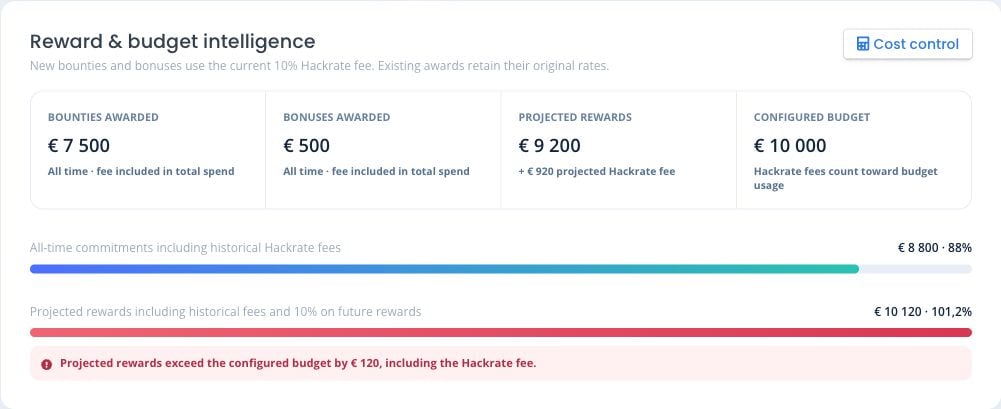
€1,200 of program budget remains.
The sample program has a €10,000 limit. It has awarded €7,500 in bounties and €500 in bonuses. Adding €800 in recorded fees brings the total commitment to €8,800.
A €1,200 award would exceed the limit.
With an illustrative €120 fee, the new award would add €1,320 and take commitments to €10,120. Hackrate blocks that award. An authorized administrator decides whether the program should pause.
Organization bounty pool
Top up funding and check the program limit.
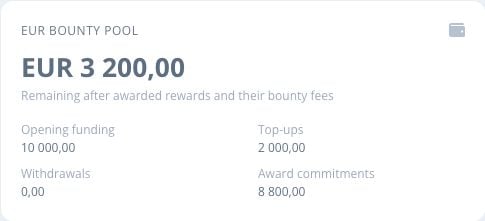
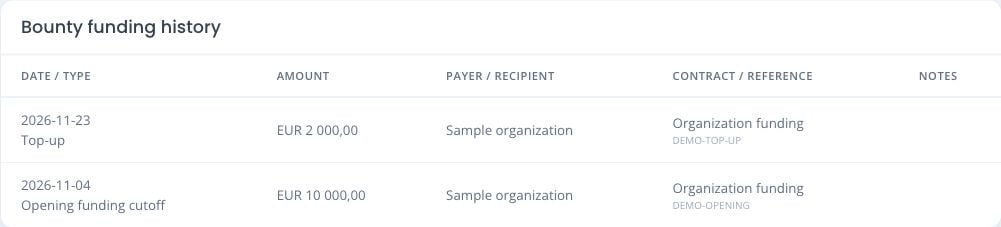
Arrange additional funding with Hackrate. Once received, the top-up is recorded against the organization’s bounty pool for that currency. Your team can review the funding history and the balance after awards and their fees.
In the demo, €10,000 in opening funding plus a €2,000 top-up, less €8,800 in award commitments, leaves €3,200 in the EUR pool. The program still has €1,200 of budget headroom. Finance and the program owner should review both amounts before approving more spend.
Program Management
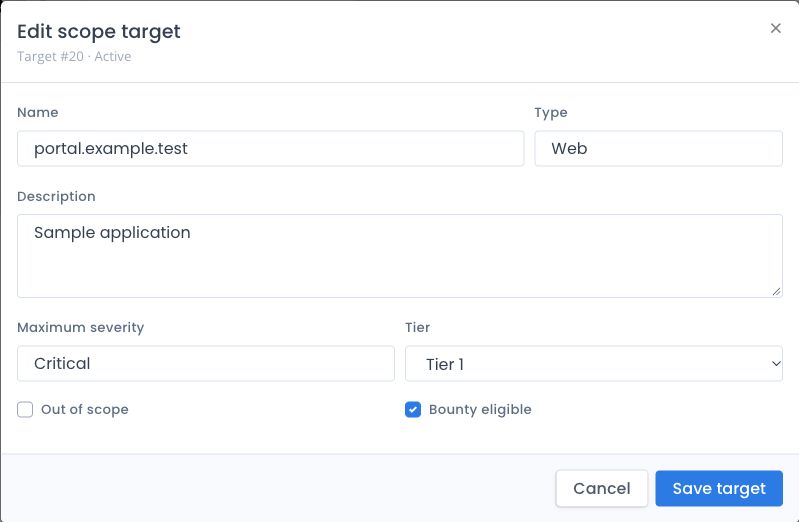
Set reward amounts by target tier and severity.
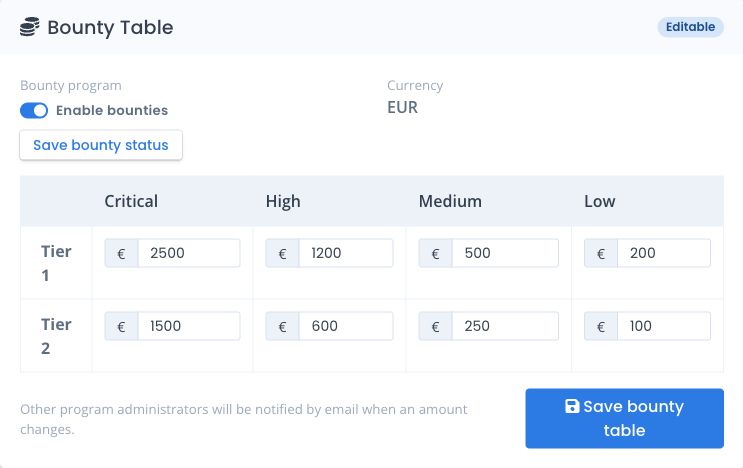
In Program Scope, a program SuperAdmin opens an approved target, chooses its Tier, and selects Save target. In the Bounty Table, the administrator sets Critical, High, Medium, and Low amounts for each tier and selects Save bounty table.
In this demo, a High finding on the Tier 1 portal corresponds to €1,200. A High finding on the Tier 2 support site corresponds to €600. Saving edited amounts creates a new version of the table. Past versions and awards remain on record.
| Target tier | Critical | High | Medium | Low |
|---|---|---|---|---|
| Tier 1 | €2,500 | €1,200 | €500 | €200 |
| Tier 2 | €1,500 | €600 | €250 | €100 |
Switch to points only when you want intake to continue.
A program SuperAdmin can turn off Enable bounties and select Save bounty status. Reports can still come in and eligible researchers can earn reputation points in the standard workflow. The existing bounty table is available if you re-enable monetary bounties.
Before changing terms, review already-submitted reports and promised awards with the program owner. Set an effective date and tell researchers which terms apply to reports in progress.
Pause intake
Keep working on the reports you already have.
Use Pause in Program Management when you need to stop new submissions. Your authorized team can continue working the open backlog and updating researchers.
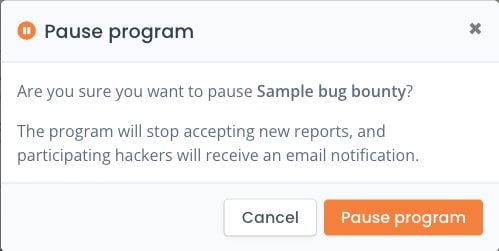
| When a program pauses | What happens |
|---|---|
| New submissions | The program stops accepting new reports. Hackrate sends participating researchers a pause notification. An over-budget award attempt leaves the program’s current state in place. |
| Open reports | Existing reports retain their status, history, and awarded amounts. Authorized users can keep reviewing them, reply in the report thread, and follow up on remediation. |
| Pending awards | When monetary bounties are enabled, eligible awards still depend on the usual permissions, report status, and configured budget. Review outstanding commitments before making a change. |
| Resuming intake | A program SuperAdmin explicitly selects Resume program. Review the backlog, approved funding, and remaining program budget before reopening. |
Program owner checklist
Before changing rewards or pausing.
- Review outstanding reports and any promised or pending award.
- Confirm the configured limit and available pool balance in the program currency.
- Give each accepted finding a remediation owner and a follow-up date.
- Agree who updates researchers and when revised terms take effect.
- Assign who can approve new funding or resume intake.
Frequently asked questions
The details worth agreeing.
Use these answers to prepare the conversation about your own scope and responsibilities.
What counts toward the Hackrate bug bounty program budget?
The program budget counts awarded bounties, bonuses, and the Hackrate fees recorded for those awards. When an eligible award is submitted, Hackrate checks its amount and applicable fee against the remaining program budget. Service and management pricing are agreed separately.
Does a bounty pool top-up increase the program budget?
A top-up adds funding to the organization’s bounty pool in the relevant currency. The configured program limit is managed independently. Review both the available pool balance and the program’s remaining budget before approving further spend.
How do Tier 1 and Tier 2 bug bounty rewards work?
An authorized program SuperAdmin assigns a tier to an approved target and sets amounts for Critical, High, Medium, and Low findings in the corresponding row of the bounty table. Saving edited amounts creates a new version of the table while historical table versions and recorded awards are retained.
Can I switch an active Hackrate program to points only?
A program SuperAdmin can turn off Enable bounties and save the bounty status. The standard workflow can continue receiving reports and awarding eligible reputation points. The existing bounty table is preserved for re-enabling. Review pending commitments and notify researchers before changing reward terms.
What happens to open reports when a Hackrate bug bounty is paused?
A pause stops new report submissions. Existing reports retain their status, comments, and recorded awards. Authorized users can review and reply to them. Eligible awards in a monetary program still follow the usual permissions, report status, and budget checks.
Related guides
Browse all buyer guidesHow Much Does a Bug Bounty Program Cost?
Plan a bug bounty budget: platform and management fees, researcher rewards, setup and internal effort. See a worked example and a practical quote checklist.
Read the guideBug Bounty Scope Examples for SaaS, APIs, and Mobile Apps
Compare example bug bounty scopes for SaaS, APIs, and mobile builds. Define authorized assets, test access, exclusions, and report eligibility.
Read the guideWhat If Your Bug Bounty Gets No Valid Reports?
Diagnose a quiet bug bounty program. Check participation, access, report outcomes, scope and rewards before changing the program.
Read the guideA practical next step
Set up the controls before your program starts.
Bring your expected reward budget, scope, and who can approve changes. Hackrate can walk you through spend projections, funding, and what your team will handle if you pause.

Hackrate
Our platform helps companies to identify software vulnerabilities in a cost-efficient way. It provides a secure and centralized view of ethical hacking projects for your company.
US Patent Applied for HackGATE #63/645,845

Products
From the Blog
-
Hackrate Ranked 1st in Hungary and 22nd Globally at Hack The Box’s Global Cyber Skills Benchmark 2026
May 29 • 13 min read
-
Press release: Hackrate becomes Hungary’s first CVE Numbering Authority
Jan 13 • 5 min read ★
-
Let 2026 be the year bug bounty becomes part of how you build and operate
Jan 05 • 4 min read


Marketplace

Hackrate Ethical Hacking Platform |
2026 ©
 Numbering Authority